Designers who create data graphics.
We observed or interviewed fifteen of them: design students, academics, and designers at a software company, at a research lab, and freelance. We sat in a hackathon, and watched them work in a lab setting.
Their tools don't connect to their data.
Most of the designers we met draw their graphics by hand in a tool like Adobe Illustrator. They had mixed feelings about this: while some designers felt that hand-placing data points helped them develop an intuition about their data, others found it time-consuming and error-prone.
“there’s this lack of being able to connect real data to [Illustrator].”
Designer. From Reflections on How Designers Design With Data
It is hard to build data-driven graphics.
We watched designers work in the lab and at a hackathon, and interviewed more. We saw a series of patterns that showed the difficulties of bringing real data into designs. For example, some designers sketched the layout and axes first, then drew in data points from how they expected the data to look.
Other designers were more familiar with data analysis tools, but saw a two-step process: they would create a visualization in D3 or Tableau, then export it to drawing tools for hand refinement.
Hanpuku: edits can travel back from the drawing tool to the code.
We wanted to support a process that incorporated iteration in both data tools and illustration tools. We wanted to allow designers to iterate in both tools: to be able to make updates to the data tool that would update correctly in the drawing tool. Our tool, Hanpuku, treats this as a merge problem, and brings together edits in the drawing and data tools.
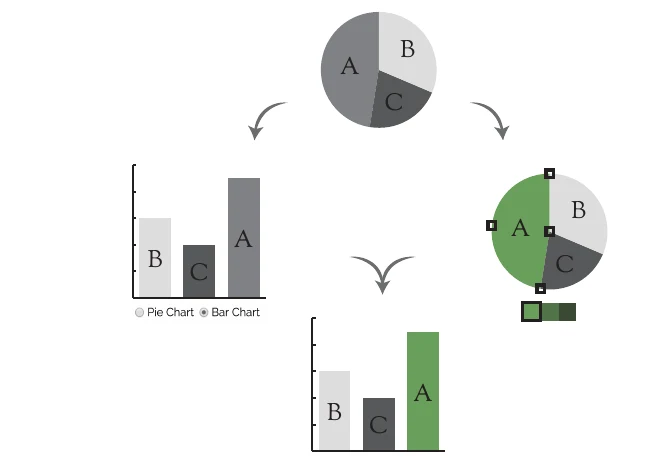
Enriching the design process with data.
The study, Reflections on How Designers Design With Data (AVI 2014), won the Best Paper Award.
The paper about Hanpuku, Iterating Between Tools to Create and Edit Visualizations was published at IEEE InfoVis 2016.